
ledgerely.com

View Categories

Chart Wrapper

Chart Wrapper - Ledgerely #

The Chart Wrapper is the central workspace where charts are loaded and managed. Users can customize their charts by dragging, resizing, rotating, and modifying properties. The wrapper provides intuitive controls to enhance the visualization experience.
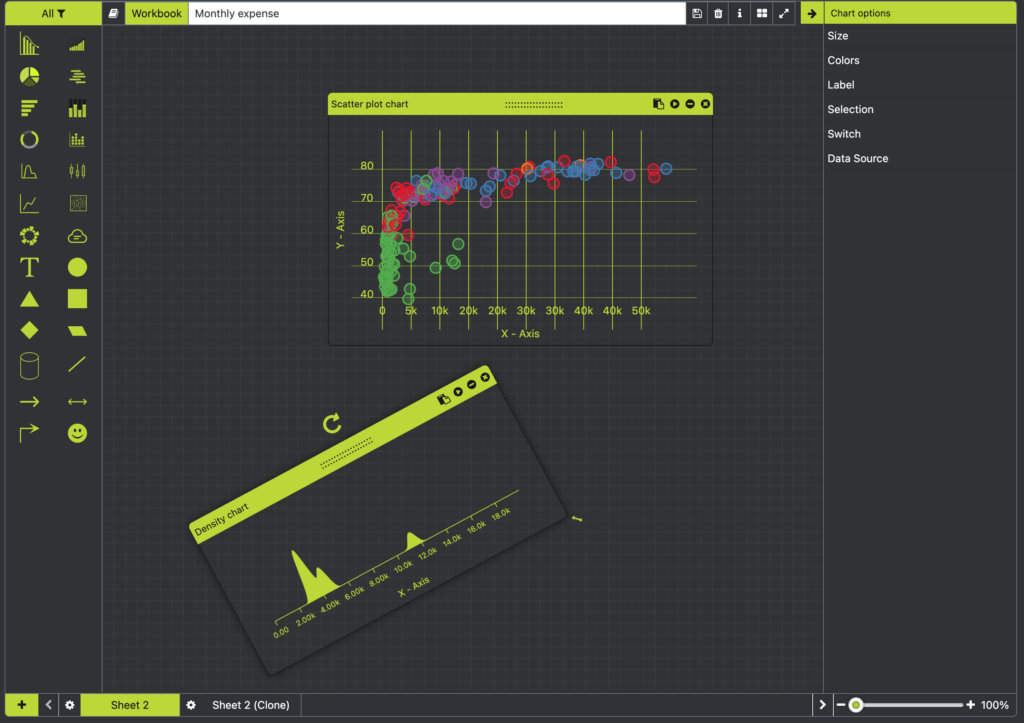
chart wrapper

Key Features #

Chart Selection & Customization #

  • Clicking on a chart activates the chart options panel.
  • Charts can be dragged and repositioned within the wrapper. (Only slow mouse motion is allowed for precise placement.)

Interactive Controls #

Each chart includes the following functional controls:
Rotator #
  • Enables 360-degree rotation of the chart.
  • Users can rotate the chart to any angle based on preference.
Resize Handler #
  • Located at the bottom-right corner of the chart.
  • Allows dynamic resizing of width and height via drag-and-drop interaction.

Window Buttons #

Each chart contains a set of window buttons for additional actions:

  • Clone: Duplicates the chart and places the new copy in the top-left corner of the wrapper.
  • Preview: Opens the chart in full-screen mode for detailed visualization.
  • Minimize: Minimizes the chart; can be toggled back to maximize.
  • Delete: Removes the chart from the wrapper for the selected sheet. *(Shortcut: Delete key)

The Chart Wrapper ensures a seamless and efficient workflow, providing users with maximum control over chart visualization and interaction.