
Table of Contents
The Bank List section is a feature that enables users to manage their bank accounts within the app. This section ensures that users can store, edit, and organize bank details efficiently. However, at least one bank account must always remain in the system, meaning users cannot delete all bank entries. The system supports CRUD (Create, Read, Update, Delete) operations, allowing users to add new bank accounts, modify existing details, remove unnecessary accounts (except when only one remains), and reorder them as needed.
Features #
Bank List Table #
The bank list is structured in a tabular format, where each row represents a bank account entry. The table contains the following key fields:
- Bank – Displays the name of the bank (e.g., HSBC, Citibank, Chase).
- Account Number – Stores the bank account number linked to the user.
- Swift Code – Contains the SWIFT code used for international banking transactions.
- Type – Identifies whether the account is a Savings or Business account.
Country – Specifies the country where the bank operates. - Sort Order – A numeric value that determines the order in which bank accounts appear in the list.
- Language Format – Captures the browser locale, allowing the user to choose a preferred language from a dropdown menu.
- Currency (3-digit) – Indicates the bank’s operating currency, selectable from a dropdown menu (e.g., USD, EUR, INR).
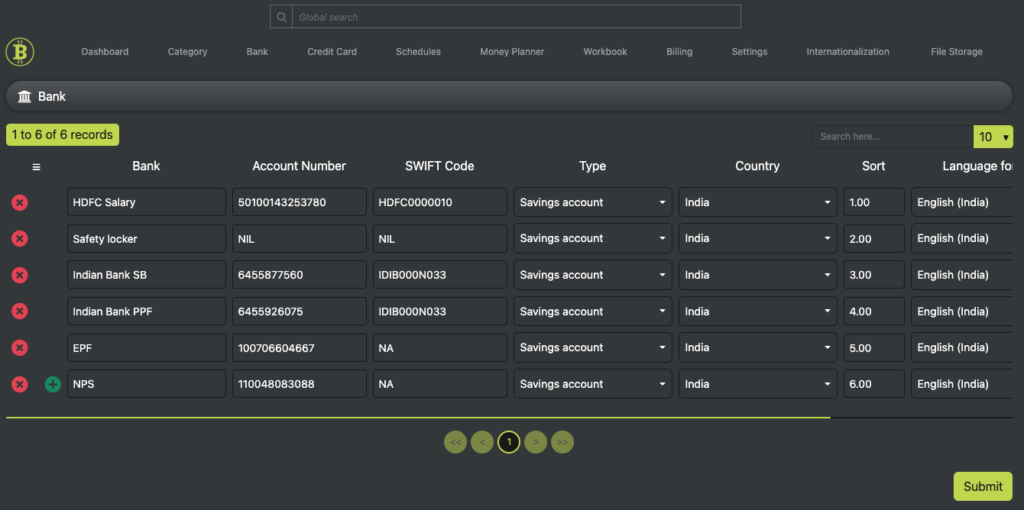
This structured format ensures that users can efficiently manage multiple bank accounts in an organized manner.
Data Handling #
- CRUD Operations: Users can create, read, update, and delete actions on bank details.
- Pagination: To enhance performance and usability, the system displays 10 records per page by default. If the user has more than 10 accounts, they can navigate between pages.
- Submit Button: Changes made to the bank list (such as adding a new account, modifying details, or reordering entries) must be explicitly saved by clicking the “Submit” button.
- Per-Page Submission: Users can only save and submit modifications for the current page they are viewing. This means that if they are working across multiple pages, they must submit changes page by page.
Why This Structure? #
- Ensures Data Integrity: Preventing the deletion of all bank accounts maintains the app’s operational integrity.
- User Convenience: Dropdown options for language and currency simplify selection and reduce errors.
- Performance Optimization: Pagination ensures smooth performance, especially when handling multiple bank records.
- Explicit Confirmation: The “Submit” button ensures that users intentionally save changes, preventing accidental modifications.


