ledgerely.com

View Categories

Subscription History – Billing Page

View Your Subscription Transactions | Subscription History #

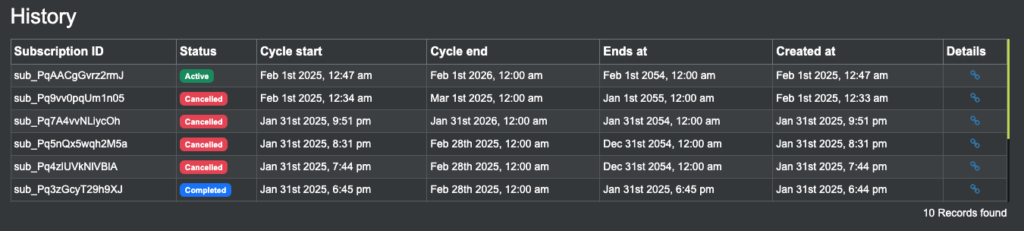
The Subscription History table at the bottom of the Billing Page helps users track their past transactions. It automatically loads data from Razorpay API subscriptions as you scroll.

How It Works

  • The table displays subscription details in real time.
  • Lazy loading is enabled (10 transactions load at a time).
  • Once there are no more records, loading stops.
  • A loader icon appears when fetching new data.
  • The total records count is displayed at the bottom right.

What You’ll See in the Table #

Field NameWhat It Means
Subscription IDUnique ID assigned to your subscription.
Cycle StartDate when your billing cycle started.
Cycle EndDate when your billing cycle ended.
ExpiryThe expiry date of your subscription.
Paid AtDate & time when payment was made.
Created AtThe date your subscription was created.
Details LinkA link to view full transaction details.
subscription history

How to Use the Subscription History Table #

  • Scroll down to load more transactions.
  • No pagination required – transactions appear as you scroll.
  • If no data is found, a “No records available” message appears.
  • A loading icon will show when fetching more data.

Note: The system automatically stops fetching data when no more transactions are available.