
ledgerely.com

View Categories

Close Account Workflow

Ledgerely provides users with the option to close their accounts if they wish to discontinue the service. The closure process includes a confirmation step to prevent accidental deletions. Users also have a 365-day grace period to revoke their closure request and restore their account.
Closing an Account #

Accessing the Close Account Option #

  • A “Close Account” button is available at the bottom of the page.
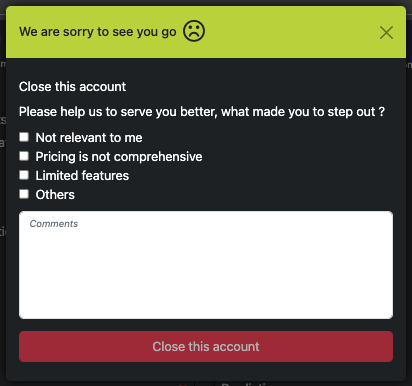
  • Clicking this button opens a modal popup for account closure confirmation.

Account Closure Form Validation #

  • At least one checkbox must be selected (reason for closure).
  • A comment field should be filled before proceeding. The “Close this account” button remains disabled until both conditions are met.
Submitting the Closure Request #
    • Once the “Close this account” button is clicked, a closure request is sent to the database.
    • The account enters a 365-day retention period, during which:
    • The account remains inactive.
    • All account-related data is scheduled for deletion within 365 days.

Revoke Account Closure #

Reopening the Account #

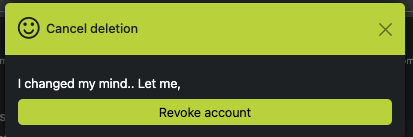
  • Within 365 days, users can log back in and choose to revoke their closure request.
  • A “Revoke Account” button is available on the same page.

Reactivation Process #

  • Clicking “Revoke Account” will cancel the closure request, restoring the account.
  • The user can continue using Ledgerely without data loss.