
ledgerely.com

View Categories

Update user

Update user #

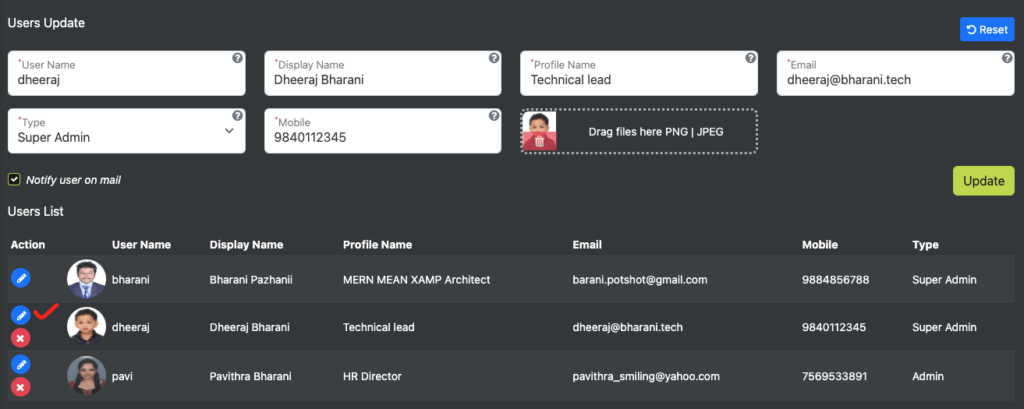
When a user clicks the pencil (blue) edit icon, the form is populated with the user’s existing information, and the form enters update mode.

Form Behavior in Update Mode #

Form Validation #

  • All validation rules remain the same as in insert mode.

User Name Field #

  • The user name is disabled during updates (cannot be modified).

Email Field #

  • Must be unique across the entire database (prevents login conflicts).

Image Upload Handling #

  • If an old image exists, it is displayed on the left side for preview.
  • If a new image is uploaded, it appears on the right side of the upload field.
  • Max file size: 200KB.
  • The old image can be deleted by clicking the trash icon.
User Update

User Role-Based Permissions #

Super Admin Privileges: #

  • Can create new users with all form fields.
  • Can update other users’ details, except:
    • Username (cannot be changed).
    • Password (cannot be changed).
  • Can delete any user (Admin or Super Admin).
  • Has exclusive access to:
    • Application Settings
    • User Settings Page

Admin Privileges: #

  • Cannot access application settings or user settings.
  • Cannot delete other users.

Self-Update Rules:
#

  • A user cannot change their own user type.
  • A Super Admin can change another user’s type.

Form Actions & Workflow #

  • Reset Button
    • Clicking “Reset” resets the form to insert mode.
  • Notify User by Email (Checkbox)
    • If checked, an email is sent to the created/updated user.
    • The email includes all modified form fields.
  • Submit Action
    • Only updated fields are pushed to the database (no unnecessary updates).\

Access Control Summary #

Action

Super Admin

Admin

Self-User

Create new users

Update other users (except username & password)

Change user type

✅ (for others)

Delete users

✅ (Admin & Super Admin)

Access application settings

Access the user settings page
Final Notes #

  • The update mode ensures that only modified fields are updated in the database.
  • Admins have restricted permissions and cannot modify or delete users.
  • Super Admins have full control over user management and system settings.