ledgerely.com

View Categories

Credit Card Account

Credit Card Dashboard – Ledgerely #

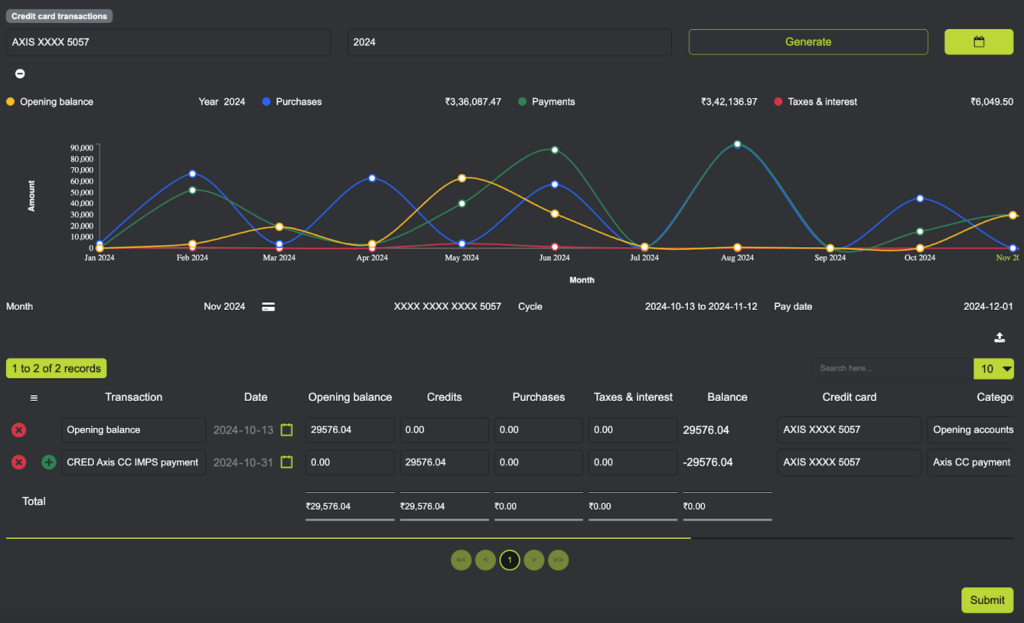
The Credit Card Dashboard in Ledgerely provides a structured and interactive way to analyze credit card transactions. Users can track spending patterns, credit limits, and other financial metrics using dropdowns, line charts, and data grids.
Credit Card Dashboard

Dropdowns #

  • Year Selection → Users can select a specific year to view financial data.
  • Bank Selection → Users can choose a specific bank to filter transactions and visualizations.

Line Charts #

  • Year Selection → Allows users to select a specific year to view transactions.
  • Card Selection → Filters data based on the selected credit card.

Line Charts #

Yearly Overview (X-Axis: Month | Y-Axis: Amount) #

  • Displays monthly credit card expenses for the selected year.
  • Helps users track spending trends over time.

Transaction Data Grid #

Loads transaction records for the selected month, displaying:
  • Transaction Date
  • Description
  • Transaction Amount
  • Status (Pending, Cleared, Paid, etc.)

Action Button #

Import Button (Top Right) #

  • Enables users to bulk import transactions.
  • Supports CSV and Excel formats for easy data migration.

Note: This dashboard provides a clear and structured view of credit card transactions, making it easier to track expenses, manage balances, and plan finances effectively.