
Table of Contents
Chart Options Pane – Ledgerely #
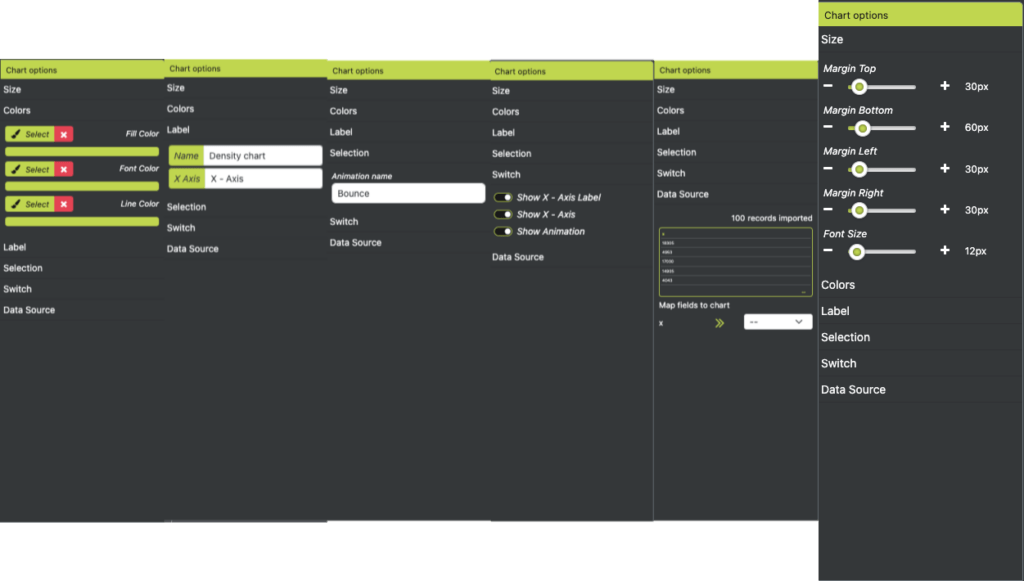
The Chart Options Pane in Ledgerely provides a comprehensive set of customization options for charts. It appears on the right side of the screen and is visible only when a chart is selected. The pane consists of six accordion-style sections, each allowing users to modify various aspects of their charts dynamically.
Accordion Sections & Their Functions #
Size #
- Controls margin and font sizes of the chart.
- A numeric slider with default values allows users to adjust settings based on preference.
Colors #
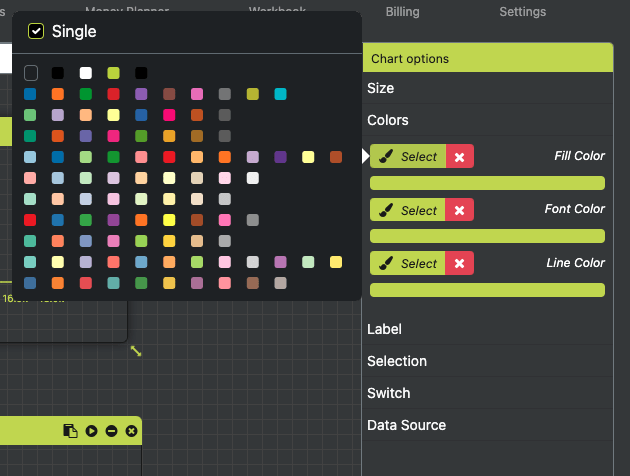
- Defines chart colors, including text, fill, and line colors.
- Selecting colors opens an overlay color palette.
- Users can choose between Single and Multiple color options:
- Single Selection: Only one color can be applied.
- Multiple Selection: Users can add or remove colors dynamically.
Labels #
- Allows customization of chart labels, including:
- Chart Name
- X-Axis Name
- Y-Axis Name
- Labels are entered via a text box (Max 25 characters).
- Changes are saved automatically as users type.
Selection #
- Provides a predefined dropdown list for customization options.
- The selected option applies specific effects to the chart.
- Example: Animation Types, where users can choose different animation styles.
Switch #
- Functions as a toggle switch to enable or disable certain chart features.
- Typically used for show/hide options.
- Styled as a standard ON/OFF switch for ease of use.
Datasource #
- Defines the data source used to populate the chart.
- Users click on a sample table (bordered in green) to open the Data Source Popup.
- The popup enables users to create dynamic queries for retrieving data. (See Story #49 for details.)
- Once data is imported, it appears in the sample table for preview.
- Users can map fields from two dropdowns:
- Label: Defines the categorical axis (X-axis).
- Value: Defines the numerical axis (Y-axis).
- The chart updates in real time as data is mapped and imported.
Conclusion #
The Chart Options Pane provides an intuitive and flexible way to customize charts in Ledgerely. With its modular accordion design, users can modify chart sizes, colors, labels, interactivity, and data sources effortlessly. These features ensure that charts are not only visually appealing but also dynamically generated based on real-time data.


