ledgerely.com

View Categories

Sheet Pane Functionality

Sheet Pane Functionality – Ledgerely #

The Sheet Pane in Ledgerely provides a structured and efficient interface for managing multiple sheets related to financial planning and visualization. This section outlines the core functionalities, including sheet management, zoom control, and customization options.

Sheet pane

Sheet Pane Layout and Behavior #

The sheet pane is positioned at the bottom of the page as a flex group and allows users to navigate between different sheets efficiently.

Adding and Managing Sheets | Sheet Pane #

  • Clicking the “+” icon adds a new sheet.
  • A maximum of 16 sheets can be created.
  • If the sheet limit is exceeded, a notification message will appear:
    “Sheet limit exceeded.”

Sheet Navigation #

  • Clicking the “<” button selects the previous sheet.
  • Clicking the “>” button selects the next sheet.

Zoom Control #

The zoom feature enables users to adjust the visualization scale within each sheet.
  • Zoom levels can be controlled using:
    • A circular notch slider.
    • “+” and “-” buttons for incremental adjustments.
  • Each sheet maintains its own zoom level, which is saved automatically upon selection.

Sheet Customization (Settings Menu) #

Clicking the settings (⚙️) icon opens an overlay menu with options to rename, delete, or clone sheets.

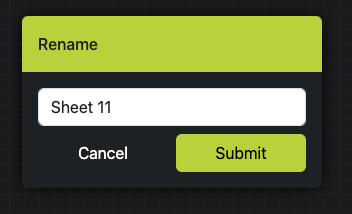
Rename Sheet #

  • A popup will prompt the user to enter a new sheet name.
  • The new name must not exceed 15 characters.
  • Options:
    • Submit: Saves the new name.
    • Cancel: Closes the popup without saving changes.

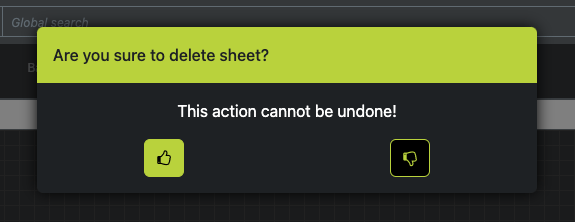
Delete Sheet #

  • A confirmation popup appears before deletion.
  • Options:
    • Delete: Permanently remove the selected sheet.
    • Cancel: Closes the popup without deleting the sheet.

Clone Sheet #

  • Duplicates the current sheet and adds it as a new sheet within the pane.

Conclusion #

The Sheet Pane in Ledgerely is designed to enhance financial tracking and planning by providing seamless navigation, efficient zoom controls, and robust customization options. These features ensure a streamlined and user-friendly experience for managing multiple financial sheets.