
ledgerely.com

View Categories

Entity Relationship Diagram (ERD)

Accessing the ERD #

  • Inside the Datasource Popup, click the ERD icon (as shown in Screenshot 1).
  • A new popup will open, displaying the Entity Relationship Diagram (ERD).

Core Tables in the ERD #

The ERD consists of five core tables that define the structure and relationships in Ledgerely’s database:

  • Banks
  • Credit Cards
  • Categories
  • Bank Transactions
  • Credit Card Transactions

These tables are interconnected through Primary Key (PK) and Foreign Key (FK) relationships to ensure data consistency.
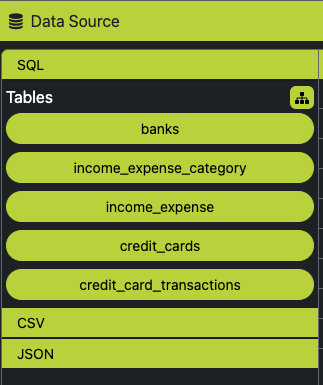
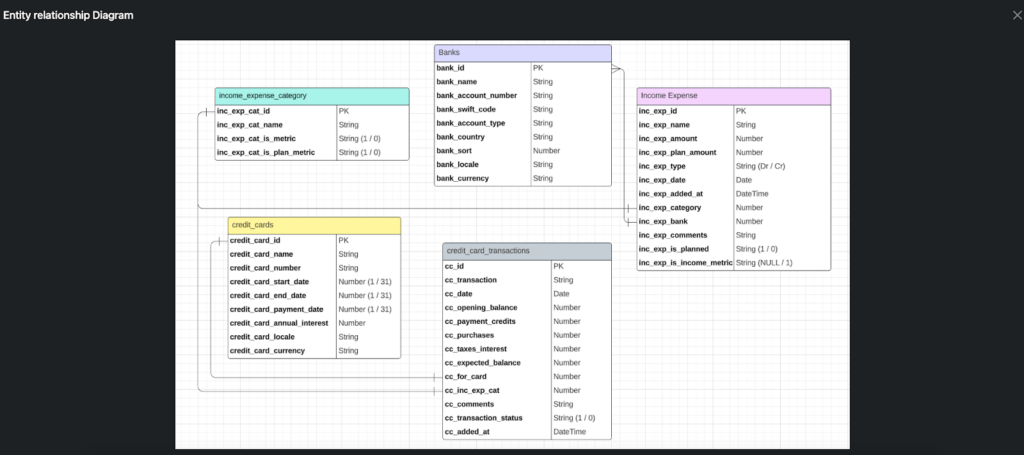
Ledgerely ERD

Understanding the Table Relationships #

  • The PK-FK relationships are visually represented in the ERD, showing how different tables are linked.
  • This structure helps users understand the flow of financial data across different entities.

How the ERD Helps Users #

The ERD assists in creating dynamic database queries using:
  • JOIN clauses (INNER JOIN, LEFT JOIN, RIGHT JOIN) for retrieving data from multiple tables.
  • SELECT, FROM, WHERE for filtering and fetching records efficiently.
  • ORDER BY to sort results based on specific columns.
  • GROUP BY for aggregating data, making reporting and analytics easier.

Benefits of Using ERD in Ledgerely #

  • Provides a clear understanding of the database structure.
  • Helps in writing optimized queries for reports and insights.
  • Ensures data integrity by maintaining correct PK-FK relationships.