
Table of Contents
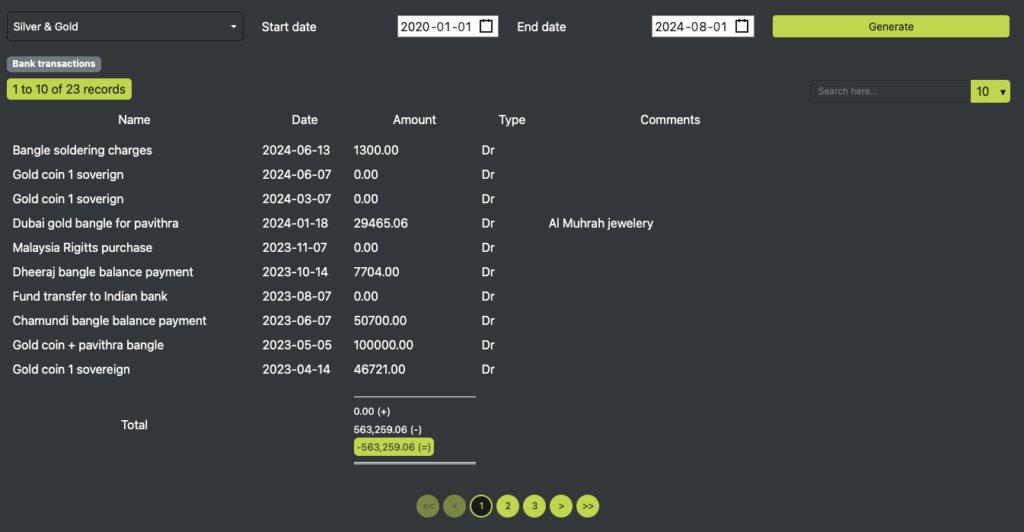
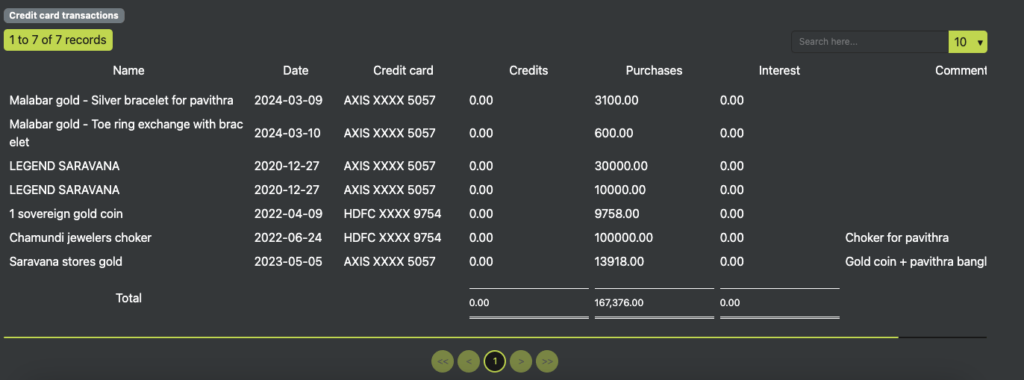
The Categorized Transactions section allows users to filter and view categorized transactions based on specific date ranges. Users can also generate reports for bank and credit card transactions, ensuring a clear financial overview.
Features #
Transaction Filtering #
- Searchable Dropdown: Users can select categories through a dropdown with search functionality for quick filtering.
- Start & End Date Picker: Allows users to define a date range for viewing transactions.
- Generate Button: Once clicked, it retrieves and displays categorized transactions based on selected filters.
Transaction Categories #
Bank Transactions #
Displays transactions related to bank accounts with the following columns:
- Name – The transaction name or description.
- Date – The date when the transaction was recorded.
- Amount – The transaction amount.
- Type – Specifies whether the transaction is an Income or Expense (DEBIT / CREDIT).
- Comments – Additional details or notes about the transaction.
Credit Card Transactions #
Displays transactions made using a credit card with the following columns:
- Name – The transaction name or merchant details.
- Date – The date of the transaction.
- Credit Card – The credit card used for the transaction.
- Credits – Any credited amounts (e.g., refunds or cashback).
- Purchase – The amount spent on the transaction.
- Interest – Any interest charges applied to the transaction.
- Comments – Additional notes regarding the transaction.
3. Data Handling & Submission Rules #
- Filtering Transactions: The dropdown and date range selectors allow users to search, filter, and refine their transactions.
- Dynamic Display: The system renders categorized transactions upon clicking the Generate button.
- Efficient Tracking: Transactions are neatly categorized, ensuring easy financial analysis and reporting.
BENEFITS OF THESE FEATURES #
- Faster Search & Filtering – Users can quickly find specific transactions using the dropdown and date picker.
- Clear Categorization – Differentiates between bank transactions and credit card transactions for better financial insights.
- Enhanced Financial Management – Helps users track expenses, manage budgets, and monitor cash flow effectively.


