
Table of Contents
Overview #
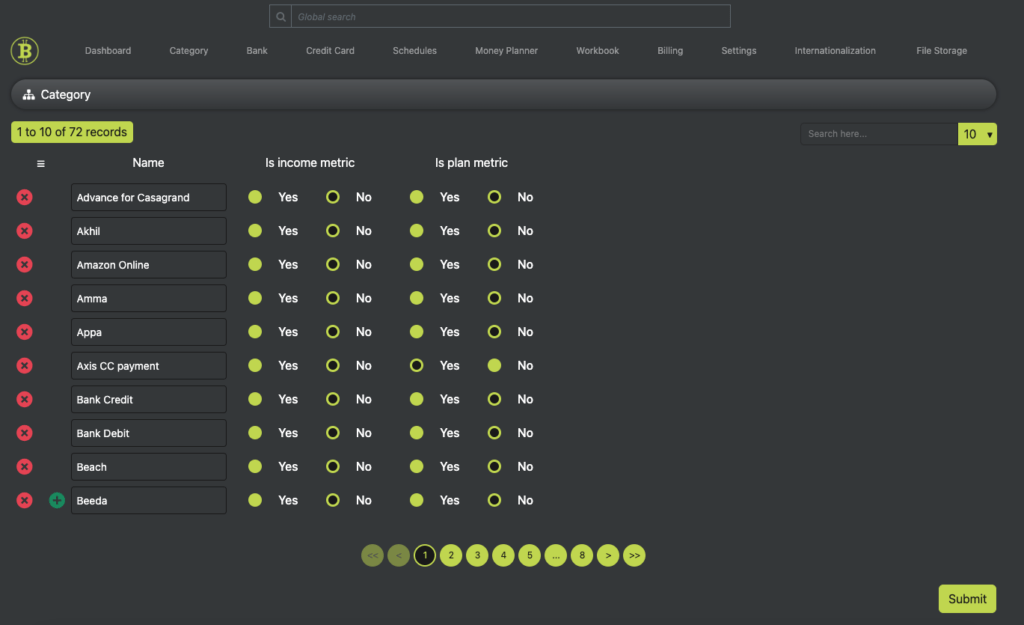
The Category List section allows users to manage financial categories associated with the app account. A minimum of one category must always be present, meaning users cannot delete all categories. This feature supports CRUD (Create, Read, Update, Delete) operations, enabling users to add, edit, or remove categories as needed.
Features & Functionalities #
The table consists of the following columns:
Category List Table #
- Name: The name of the category (e.g., Salary, Rent, Investments).
- Is Income Metric: Indicates whether the category is related to income (Yes/No).
- Is Plan Metric: Specifies whether the category can be included in financial planning (Yes/No).
Data Handling & Submission Rules #
- CRUD Operations: Users can create, read, update, and delete category entries.
- Pagination: Displays 10 records per page by default to improve performance and usability.
- Submit Button: Any modifications to categories must be saved by clicking the “Submit” button.
- Per-Page Submission: Changes are saved only for the current page the user is working on. If multiple pages exist, users must submit modifications for each page separately.
Why Ledgerely’s Category Management Matters #
- Prevents Complete Deletion: Ensures at least one category remains for system functionality.
- User Control: Allows customization of financial categories based on income and planning needs.
- Efficient Data Management: Pagination improves system performance and usability.
- Explicit Confirmation: The “Submit” button prevents accidental changes from being lost.


