
Table of Contents
Overview #
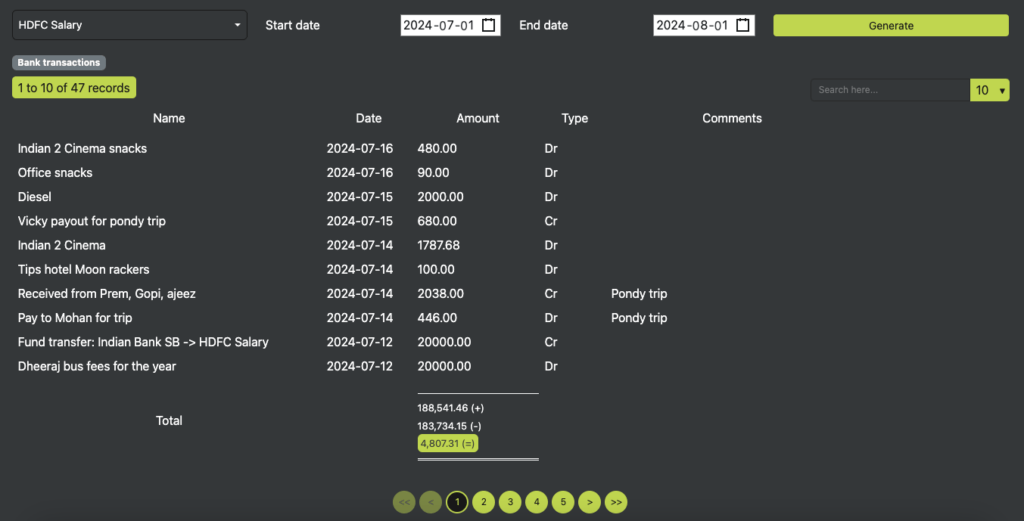
The Bank Transactions section allows users to filter and view transactions associated with their bank accounts. Users can refine their search using a searchable bank dropdown and a date range picker to retrieve specific transactions.
Features & Functionalities #
Transaction Filtering #
- Bank Searchable Dropdown: Users can select a bank account from a dropdown with search functionality.
- Start & End Date Picker: This enables users to define a date range for viewing transactions.
- Generate Button: Once clicked, it retrieves and displays transactions based on the selected bank and date range.
Bank Transactions Table #
The generated table displays filtered bank transactions with the following columns:
- Name – The transaction name or description.
- Date – The date when the transaction was recorded.
- Amount – The transaction amount.
- Type – Specifies whether the transaction is an Income or Expense (debit/credit).
Data Handling & Submission Rules #
- Filtering Transactions: Users can search and filter transactions using the dropdown and date range selector.
- Dynamic Display: Transactions are generated and displayed after clicking the Generate button.
- Efficient Tracking: Helps users monitor their financial activities and manage their bank account transactions effectively.
- Explicit Confirmation: The “Submit” button ensures that users intentionally save changes, preventing accidental modifications.
BENEFITS OF THESE FEATURES #
- Quick & Easy Search – Find transactions by selecting a specific bank and date range
- Better Financial Tracking – Enables users to monitor income and expenses efficiently
- User-Friendly Interface – Simple and intuitive filtering options for seamless transaction management.


