
User Login & Onboarding at Ledgerely #
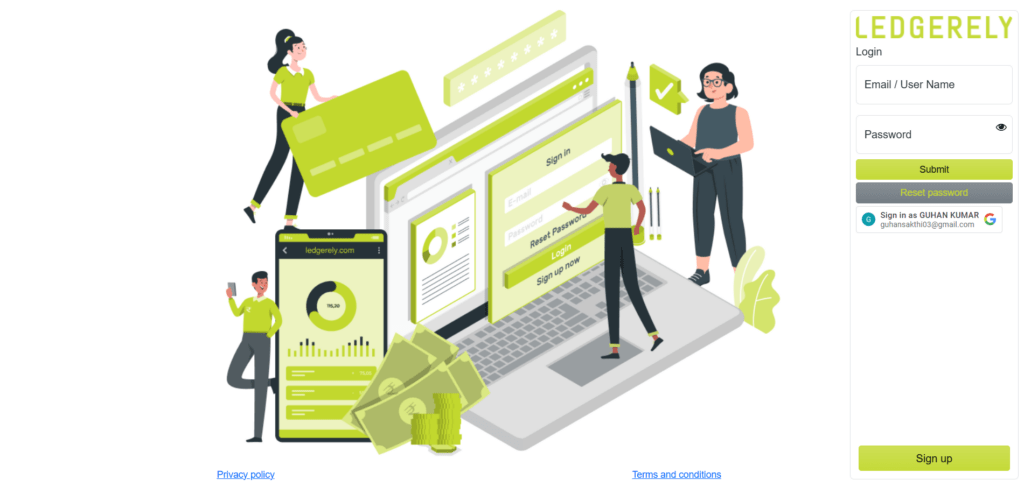
The Login Page on Ledgerely serves as the secure authentication gateway for users to access their accounts and manage various activities. It ensures that only authorized users can access their accounts, view transaction histories, and perform other essential functions. Below is a detailed breakdown of the features and functionalities of the Ledgerely Login Page
Key Features of the Login Page #
User Authentication #
The Login Page requires users to input valid login credentials (either email or username and password) to access their secure account. This ensures that only authorized users can access their personal data and manage transactions within their Ledgerely account.
Input Fields #
- Email/Username: Users must enter their registered email address or username to proceed with authentication.
- Password: A secure password field is provided, where users can enter their password to verify their identity.
Security Measures #
- All passwords are encrypted, ensuring that user data is protected against unauthorized access.
- The login process adheres to robust authentication protocols, preventing any unauthorized login attempts and ensuring secure access.
User-Friendly Functionalities #
- Forgot Password?: A password recovery option is provided for users who have forgotten their login credentials. This feature redirects users to the Reset Password menu for seamless recovery.
- Show/Hide Password: To facilitate easy credential entry, users can toggle the visibility of their password while typing, reducing the chance of errors.
Error Handling & Notifications #
- If incorrect login credentials are entered, users will receive an “Invalid Username or Password” error message.
- Users will be alerted if multiple failed login attempts occur, ensuring they are aware of potential security issues or mistakes in entering credentials.
Login Submission #
- Once users input valid credentials and click the Login button, the system will authenticate the credentials and, upon successful verification, redirect them to the Dashboard.
- If the credentials do not match, the system will prompt an error message indicating that the entered information is incorrect.
Features for Better User Experience #
- Once users input valid credentials and click the Login button, the system will authenticate the credentials and, upon successful verification, redirect them to the Dashboard.
- If the credentials do not match, the system will prompt an error message indicating that the entered information is incorrect.
By optimizing for user security and ease of access, the Ledgerely Login Page offers a streamlined experience that meets the needs of both casual users and professionals managing their ledger accounts online.


